THE MANUAL LOOP
Another account. The same checks.
Open emulator → switch farm → inspect the game → run the task → wait → check again. Repeat for the next farm.
Viking Rise bot for Windows + LDPlayer PRE-RELEASE
Run the routine. Handle the exceptions.
Manage multiple LDPlayer farms from one command centre. Set per-farm routines and limits, review evidence when something is uncertain, and stop automation before a questionable result becomes a bigger problem.
In development, not publicly downloadable. The planner is available now—no signup required. Automation carries account risk; read the guidance before use.
Watch VRA in action Join the conversation on Discord ↗Managing customer farms? Explore VRA Operator →NOT A MOCK-UP. A REAL RUN.
Follow the highlighted controls as VRA configures a troop batch, starts training and confirms the result. Short on-screen notes explain every step.
The highlighted troop and batch controls show exactly what VRA selects.
Watch the blue Train button become an active queue. No instant-training purchase.
The GUI records the completed action. The game’s training timer continues normally.
Actual single-action Lab validation, recorded 23 September 2026. Continuous screen recordings, presented at 2× speed with idle waits trimmed and explanatory annotations added; the final result plays at normal speed. Initial preparation is omitted. Account HUD, chat and developer internals are excluded. The recording shows a verified training start; the normal in-game training timer continues afterward. Playback loops after you press play; pause at any time.
Explore all 26 action settingsBUILT FOR VIKING RISE FARM OPERATORS
VRA brings per-farm workflows, explicit resource limits and visible outcomes into one Windows command centre. Explore what it does before deciding whether it fits your farms.
Pre-release for Windows + LDPlayer. The real training demonstration shows that action—not an all-farm reliability benchmark.
Preparing your PC? Use the free setup planner →Running Viking Rise farms for other people? Give every customer a home: their farms, their routine, their service agreement and a clear record of what happened.
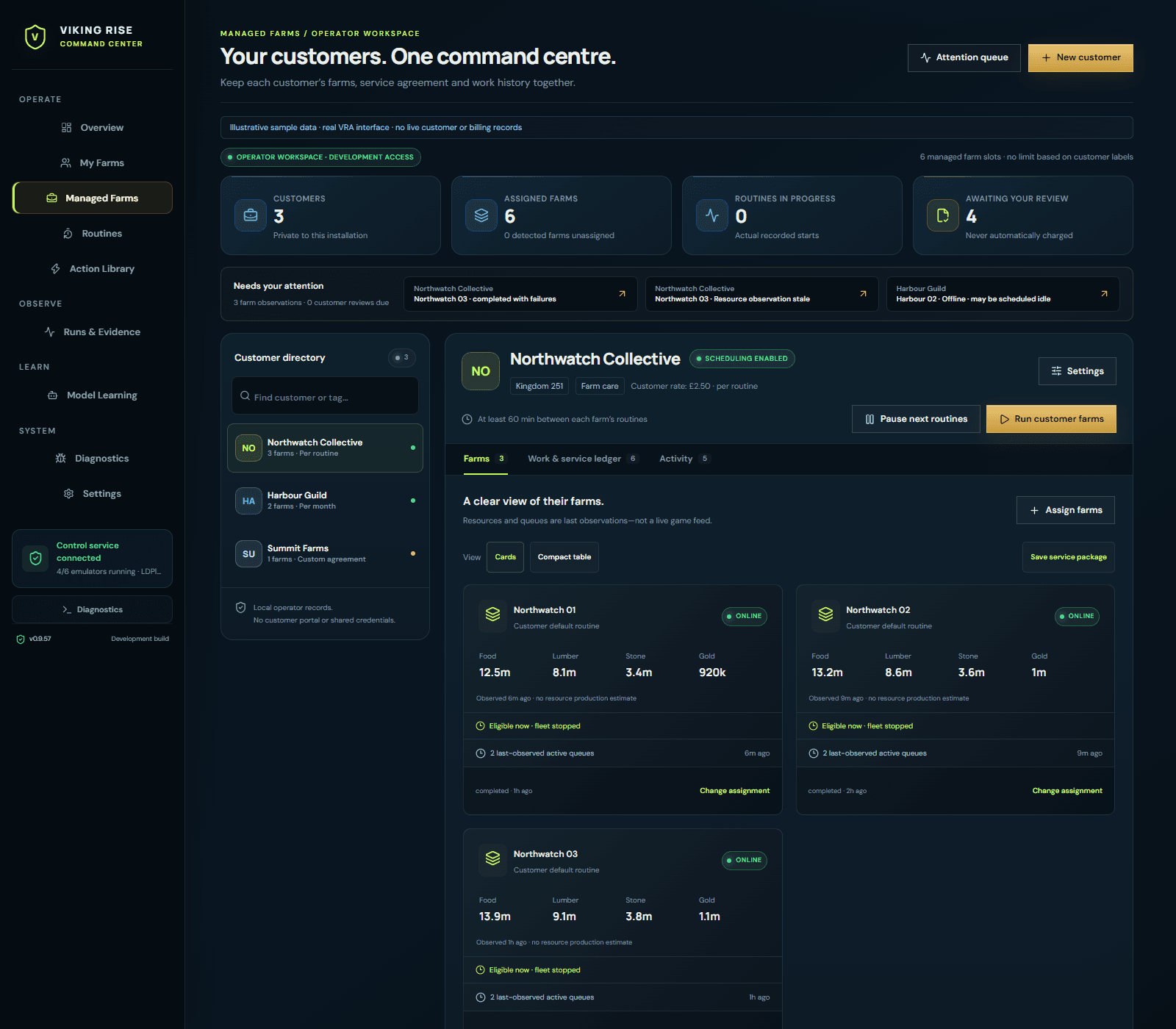
Our product aim: The Viking Rise bot that can prove what it did, knows when to stop, and improves only with your permission.
See a verified farm run →Join the waitlist Explore the Product TourHOW IT FEELS TO USE
Choose the work once. Follow the outcomes. Investigate the exceptions instead of watching every emulator.
Assign actions, schedules and limits to each farm. The same workflow engine powers validation runs and farm routines.
It looks for the expected game state. It distinguishes new work from an existing queue and records what needs your attention.
Review the farm, result and available evidence when something needs attention. Review decisions stay connected to the action that produced them.
MORE FARMS. FEWER WINDOWS TO CHECK.
Different farms can keep different routines. One overview brings readiness, assigned work and attention together.
THE MANUAL LOOP
Open emulator → switch farm → inspect the game → run the task → wait → check again. Repeat for the next farm.
THE VRA APPROACH
Review your farms → run configured workflows → inspect outcomes → act on the exceptions.
Start with one farm and a small routine, then increase concurrency within your PC’s capacity. Set concurrency to suit your hardware and the routines you choose.
How schedules and farm capacity workIT DOESN’T JUST CLICK
In the healing example below, VRA starts normal timed healing, checks the active queue and confirms tribe assistance.
Follow a verified healing action from its starting state to its recorded result, with an original screenshot crop from the development run.
The Infirmary showed wounded troops and an eligible timed Heal control after ready city output was collected.
Step through the recorded observations and original screenshot crop. This text replay follows a real development action; the Product Tour also includes a recorded training run.
BUILT TO BE INSPECTED
See the observed state, attempted action, outcome and reason for stopping. Available captures help explain a problem without replaying every step yourself.
Explore VRA EvidenceChoose supported spending permissions, resource limits and workflow policies. Recovery follows those limits, keeping review decisions in your hands.
See the reliability approachSector Vision is being developed to recognise and track moving targets in real game captures, extending the visual tools behind VRA’s farm workflows.
Inside Sector VisionScripts teach. Evidence verifies. VRA improves only with permission. How optional contribution works →
THE WORK YOU REPEAT
26 implemented workflows, each with its own checks, settings and limits. Explore the supported settings and game-state checks in the workflow reference.
Check ready city output, mail, quests and tribe rewards.
Explore workflows ↗Set research and building priorities; preserve work already in progress.
Explore workflows ↗Configure training batches, healing and eligible free recruitment.
Explore workflows ↗Choose gathering targets, march limits and which owned items to use.
Explore workflows ↗Set boundaries for commissions, exploration and daily buildings.
Explore workflows ↗RECENTLY BUILT & TESTED
Development milestones with their limits attached. VRA is pre-release; these are not public releases or fleet reliability guarantees.
VRA has completed the first internal milestone of its custom Sector Vision pipeline: focused visual recognition trained on reviewed Viking Rise captures. It brings moving animals and resource objects into the same perception layer, extending the work behind our core farming workflows.
What changed and what it provesAlongside recognition, we have completed another pass on the machinery that turns a screen observation into a farm action: report entry, city recognition, navigation checks, update preparation and recoverable development tooling.
What changed and what it provesSince our last update, development has focused on running VRA against real farms, reviewing the screenshots and fixing what actually happens in-game. Successful end-to-end action runs now cover core farm growth, rewards, recruitment and march workflows—not just opening the right menu.
What changed and what it provesTHE VRA COMMUNITY / DISCORD
See real VRA demonstrations, follow development updates and talk through the farm jobs you want off your hands.
Free to join. Discord and the email waitlist are separate; neither guarantees a beta place.
 A real run. A visible result.Recorded development test · Watch the 12-second demonstration
GO AS DEEP AS YOU LIKE
Explore the real interface, inspect the reliability method or work through the support Wiki. The technical detail stays available behind every product claim.
BEFORE YOU JOIN
Not yet. Viking Rise Automation is pre-release and not publicly downloadable. The beta list is for development, testing and launch news; joining does not guarantee a place or a release date.
No. Dataset contribution will be optional, default-off and separate from your licence and email subscription. If you opt in, VRA will handle eligible example collection during normal use. You will not need to prepare screenshots or train a model. Declining will not reduce core farm automation.
No. Teacher-guided development uses structured examples and offline evaluation. A customer action does not immediately retrain a model or change its control permissions. Models do not get to authorise their own spending or retries.
The launch trial will be free for seven days when access opens. Joining now does not start the trial. Announced monthly launch prices: Personal $11.99, Operator 25 $29.99 and Operator 100 $59.99, billed in USD per licensed Windows installation. VRA remains pre-release; sales and trial activation are not open.
VRA is unofficial automation. Its use may breach applicable game rules and can put accounts at risk of restrictions, suspension or termination. No bot can guarantee protection from enforcement. Young Studio is independent of IGG and Viking Rise.
VRA is unofficial automation. Its use may breach applicable game rules and can put accounts at risk of restrictions, suspension or termination. No bot can guarantee protection from enforcement.
Read IGG’s official terms Independent software by Young Studio. Not affiliated with or endorsed by IGG or Viking Rise.Real demonstrations. Practical setup guidance. Explore the planned free Viking Rise bot trial and get news when access opens.